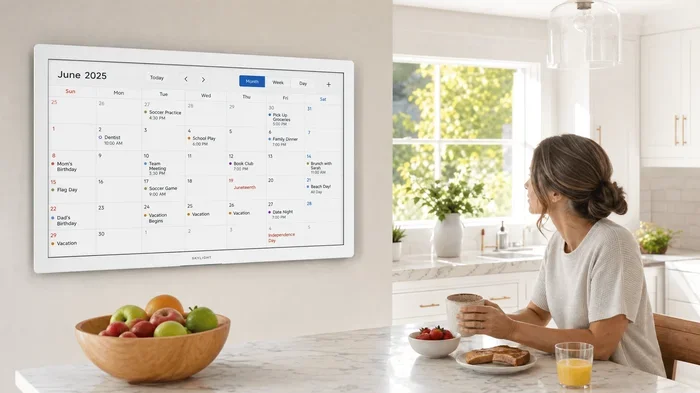
A digital kitchen calendar transforms how you plan meals, organize your family schedule, and shop for groceries. It keeps your weekly menu organized, cuts down on food waste, and takes the stress out of daily cooking. With the right setup, your kitchen becomes a well-oiled machine that saves you time and money every single week.
A digital kitchen calendar is more than just a trendy gadget. It is a practical tool that changes how you plan meals, shop for groceries, and organize your daily cooking routine. Many families struggle with deciding what to eat each night, forgetting important dates, or wasting food because they lost track of what they already bought.
The good news is that a digital kitchen calendar solves all of these problems. It brings order to your kitchen, helps you plan ahead, and makes weeknight dinners feel effortless. Whether you are a busy parent, a meal prep enthusiast, or someone who simply wants to eat better, this tool can transform your daily life.
In this article, we will explore everything you need to know about using a digital kitchen calendar for meal planning. You will learn about the different types available, how to set one up, and tips to make it work for your family. By the end, you will understand why a digital kitchen calendar is one of the best investments you can make for your kitchen.
Key Takeaways
- A digital kitchen calendar simplifies meal planning and saves time every week.
- Digital kitchen calendar tools come in many forms, from smart displays to printable templates.
- Meal planning becomes easier when your kitchen calendar syncs with grocery lists.
- Family organization improves when everyone can see and update the calendar together.
- Common mistakes include overcomplicating your system and forgetting to update it regularly.
- Consistent use of a digital kitchen calendar leads to less food waste and better eating habits.
- Smart kitchen organization with a digital calendar pays off in both time and money saved.
📑 Table of Contents
- What Is a Digital Kitchen Calendar?
- Benefits of Using a Digital Kitchen Calendar
- Types of Digital Kitchen Calendars You Can Use
- How to Set Up Your Digital Kitchen Calendar
- Tips for Making the Most of Your Digital Kitchen Calendar
- Common Mistakes to Avoid with Your Digital Kitchen Calendar
- Conclusion
What Is a Digital Kitchen Calendar?
A digital kitchen calendar is an electronic tool designed to help you organize meals, schedules, and grocery lists in one place. Unlike a paper planner stuck to the fridge, a digital version lives on a screen and can be updated instantly. It keeps all your meal planning information organized and easy to access at any time.
Think of it as your personal kitchen dashboard. Instead of flipping through scattered notes and sticky reminders, you get a clean, organized view of your entire week. This simple shift in how you track your kitchen routine can make a huge difference in your daily life.
How It Works in Your Kitchen
A digital kitchen calendar typically lives on a tablet, smart display, or phone. You can view your weekly meal plan, check family events, and see your grocery list all at once. Some smart kitchen displays let you tap to add recipes, set reminders, and even order groceries online. The screen stays visible on your counter or wall, so you always know what is coming up next.
Most digital kitchen calendar apps send push notifications to remind you about upcoming meals or shopping trips. This gentle nudge keeps you on track and prevents those last-minute “what should we eat tonight?” moments. Over time, your digital planner becomes second nature.
Why It Is Different from a Regular Calendar
A regular wall calendar shows dates and appointments. A digital kitchen calendar goes much further. It focuses on meal planning, recipe tracking, and food organization. You can link it to your grocery list, attach recipes, and color-code meals by category. This makes it a true kitchen command center rather than just a date tracker.
A digital kitchen calendar also updates in real time. If a meeting runs late or a soccer practice gets moved, you can adjust your meal plan instantly. No need to erase and rewrite. This flexibility is what sets a digital tool apart from a traditional wall calendar or paper food diary.
Benefits of Using a Digital Kitchen Calendar
A digital kitchen calendar offers many advantages for busy households. Let us look at the key benefits that make this tool so valuable for organized cooking and family life.
Saves Time on Daily Cooking Decisions
Deciding what to cook each night can be exhausting. A digital kitchen calendar takes that decision away from you. You plan your meals ahead of time, so when dinner time arrives, you already know what to make. This simple shift saves you at least 15 minutes every evening, which adds up to hours each week.
With a digital kitchen calendar, you can also batch cook more effectively. You see your full week at a glance and can plan meals that use similar ingredients. This reduces prep time and makes your cooking routine much smoother. Instead of scrambling each evening, you follow a clear cooking schedule that keeps things moving.
Keeps the Whole Family Organized
A digital kitchen calendar is not just for one person. It works for the entire family. You can share the calendar on a smart display in the kitchen so everyone can see the meal plan. Kids can check what is for dinner, and partners can add their own schedule conflicts. This shared visibility keeps everyone on the same page.
When your family knows the meal plan, they can also prepare for favorite nights like Taco Tuesday or Pizza Friday. A digital kitchen calendar builds excitement and routine, which helps kids feel more secure and organized. It turns meal time into a family activity everyone can look forward to.
Reduces Food Waste and Saves Money
Food waste is a huge problem in many households. A digital kitchen calendar helps you buy only what you need. When your meal plan is already set, your grocery list becomes much more precise. You avoid buying ingredients you will never use, which saves money and reduces waste.
Many people who switch to a digital kitchen calendar report saving $50 or more per month on groceries. That is a significant amount over a year, and it comes from simply planning better. Your food diary and meal tracker work together to show you exactly what you are buying and eating.
Makes Weekly Meal Prep Easier
Meal prep is one of the best ways to eat healthy during a busy week. A digital kitchen calendar makes meal prep simple by giving you a clear roadmap. You can schedule prep days, assign recipes to specific dates, and track your progress. This structured approach turns meal prep from a chore into a habit.
When you plan your weekly menu in advance, you also save mental energy. Instead of thinking about food multiple times a day, you follow your plan. The digital kitchen calendar handles the heavy lifting, so you can focus on actually enjoying your meals.
Types of Digital Kitchen Calendars You Can Use
Not all digital kitchen calendars are the same. Different options work better for different households. Let us explore the most popular types available today.
Smart Display Calendars
Smart displays like the Amazon Echo Show or Google Nest Hub are popular choices for a digital kitchen calendar. These devices sit on your counter and show your calendar, weather, and reminders. You can voice-activate them to add events, check the meal plan, or update your grocery list. They are hands-free, which is perfect when your hands are covered in flour or sauce.
Smart displays also connect to other smart home devices. You can set timers, play music while cooking, and control your kitchen lights all from the same screen that shows your digital kitchen calendar. This creates a truly connected smart kitchen experience that makes cooking more enjoyable.
Tablet and App-Based Options
Tablets are another great option for a digital kitchen calendar. You can mount a tablet on your fridge or wall using a simple bracket. Many meal planning apps offer calendar features built right in. Apps like Mealime, Plan to Eat, and Cozi let you plan meals, generate grocery lists, and sync across devices.
The beauty of app-based digital kitchen calendars is their flexibility. You can access your meal plan from your phone while shopping, from your tablet in the kitchen, or from your laptop when planning the week. Everything stays synced automatically. This means your family calendar and meal tracker are always up to date no matter where you are.
Printable Digital Templates
If you prefer a more traditional feel, printable digital templates work well. You download a template, fill it in on your computer, and print it out. While this is less interactive than a smart display, it still brings organization to your kitchen. You can update the template each week and keep a binder of past plans for reference.
Printable templates are also great for families who are just starting with meal planning. They offer a low-tech entry point into the world of digital kitchen calendar organization without a big learning curve. Over time, you can always upgrade to a more advanced digital planner as your needs grow.
How to Set Up Your Digital Kitchen Calendar
Setting up a digital kitchen calendar is easier than you might think. Follow these steps to get started quickly and efficiently.
Step-by-Step Setup Guide
First, choose your device. Decide whether a smart display, tablet, or app works best for your kitchen. Consider your budget, your tech comfort level, and how your family will use it. There is no wrong choice here. Each option brings real value to your kitchen organization.
Next, download or install your chosen platform. If you are using an app, search for meal planning calendars in your app store. If you are using a smart display, set it up through your phone and link your calendar accounts. Make sure to grant any necessary permissions so the app can sync properly.
Then, create your weekly meal plan. Start with simple meals for busy nights and more elaborate recipes for weekends. Add each meal to the corresponding day on your digital kitchen calendar. Do not worry about being perfect right away. You can always adjust as you learn what works best for your household.
Finally, build your grocery list based on the meal plan. Most apps and platforms let you generate a list automatically. Review it, check your pantry, and remove items you already have. This final step ensures your digital kitchen calendar is ready for the week ahead. A well-prepared grocery shopping list is the secret to stress-free cooking.
Customizing for Your Family Needs
Every family is different, and your digital kitchen calendar should reflect that. If you have picky eaters, create a separate section for their favorite meals. If you follow a special diet, add tags for gluten-free, vegetarian, or low-carb options. If you have a busy schedule with sports practices and meetings, overlay those events on your calendar so you can plan accordingly.
Customization makes your digital kitchen calendar truly useful. Take 15 minutes each Sunday to review the coming week and adjust your plan based on everyone’s schedule. This small habit makes a huge difference in how smoothly your week runs. Your kitchen routine will feel natural and effortless when the calendar fits your real life.
Tips for Making the Most of Your Digital Kitchen Calendar
A digital kitchen calendar works best when you use it consistently. Here are practical tips to help you get the most out of your setup and build lasting habits.
Sync with Your Grocery Shopping Routine
One of the best features of a digital kitchen calendar is its ability to connect with grocery shopping. After you finalize your meal plan, send your grocery list directly to your phone before heading to the store. Some smart displays even let you order groceries online for delivery or pickup.
Try to shop on the same day each week. When your digital kitchen calendar shows your upcoming meals, you know exactly what you need. This routine saves time, reduces impulse buys, and keeps your fridge stocked with exactly what you need. A well-organized grocery shopping list is the backbone of a smooth week.
Involve the Whole Family
Meal planning should not be one person’s job. Use your digital kitchen calendar to involve everyone in the household. Let each family member pick one meal per week. Kids can choose their favorite pasta night, and adults can plan more complex recipes for weekends.
When everyone contributes, the digital kitchen calendar becomes a family tool rather than a chore. It encourages communication, builds excitement for meals, and teaches kids valuable planning skills. Plus, it takes the pressure off any single person to come up with all the ideas. Shared kitchen organization leads to better results for everyone.
Use Color Coding for Quick Scanning
Color coding is a simple trick that makes your digital kitchen calendar much easier to read at a glance. Assign colors to different categories such as meatless meals, quick weeknight dinners, and special occasions. When you scan your calendar, you can instantly see your meal balance for the week.
Most meal planning apps support color coding natively. If your digital kitchen calendar does not offer this feature, you can use simple emojis or symbols as visual cues. The goal is to make your calendar scannable in seconds. Quick visual organization saves you time every single day.
Review and Adjust Weekly
A digital kitchen calendar is a living tool, not a set-it-and-forget-it system. Take a few minutes each Sunday evening to review the past week. What meals worked well? What ingredients went to waste? Use these insights to improve your plan for the coming week.
This weekly review habit is what separates casual planners from organized cooks. Over time, your digital kitchen calendar becomes more personalized and effective. You develop a rhythm that suits your lifestyle perfectly. Think of it as a weekly kitchen organization check-in that keeps everything running smoothly.
Common Mistakes to Avoid with Your Digital Kitchen Calendar
Even with the best digital kitchen calendar, mistakes can happen. Here are common pitfalls and how to avoid them so your meal planning stays on track.
Overcomplicating Your System
It is tempting to plan every meal down to the last detail. But an overly complex digital kitchen calendar can become stressful rather than helpful. Start simple. Plan three to four dinners for the week and leave room for flexibility. You can always add more structure as you get comfortable.
Remember, the goal of a digital kitchen calendar is to simplify your life, not make it harder. Keep your system straightforward and realistic for your schedule. A simple weekly menu that you actually follow beats an elaborate plan that you abandon after two days.
Forgetting to Update Regularly
The biggest mistake people make with a digital kitchen calendar is not updating it. A stale calendar is worse than no calendar at all. If your meal plan does not reflect reality, it will not help you make good decisions.
Set a recurring reminder to update your calendar each week. Many smart displays let you set weekly prompts. Treat this update time as part of your routine, just like checking the weather or reviewing your schedule for the day. Consistent updates keep your digital kitchen calendar accurate and useful.
Ignoring Seasonal and Budget Considerations
A great digital kitchen calendar accounts for what is in season and what fits your budget. Seasonal produce is cheaper and tastier, so build your meal plan around what is available. Check store flyers and plan meals around sales and promotions.
When you ignore budget and seasonality, your digital kitchen calendar loses its effectiveness. A little extra planning goes a long way toward keeping your food costs low and your meals delicious. Think of your calendar as a tool for both healthy eating and smart spending.
Conclusion
A digital kitchen calendar is one of the simplest yet most powerful tools you can add to your home. It transforms meal planning from a daily struggle into a smooth, organized process. With the right setup, you save time, reduce food waste, and eat better meals throughout the week.
Whether you choose a smart display, a tablet app, or a printable template, the key is to start and stay consistent. Your digital kitchen calendar will grow with your family and become an essential part of your weekly routine. The investment is small, but the payoff in time saved, money saved, and stress reduced is enormous.
So why wait? Set up your digital kitchen calendar today and experience the difference it makes. Your future self, standing in the kitchen with a clear plan for dinner, will thank you. Better organization, smarter shopping, and happier meals are all just one calendar away.
Frequently Asked Questions
What is the best digital kitchen calendar for families?
The best digital kitchen calendar for families depends on your needs. Smart displays like the Amazon Echo Show work well for hands-free use, while apps like Cozi and Mealime offer flexible meal planning features. Choose one that fits your family’s tech comfort level and schedule.
Can I use a digital kitchen calendar for grocery delivery?
Yes, many digital kitchen calendar apps let you generate a grocery list from your meal plan and send it directly to delivery services. Some smart displays even support voice ordering for groceries. This makes shopping faster and more convenient.
How often should I update my digital kitchen calendar?
You should update your digital kitchen calendar at least once a week, ideally on Sunday evening. This is when you review the past week and plan the week ahead. Regular updates keep your meal plan accurate and useful.
Do I need a smart display for a digital kitchen calendar?
No, you do not need a smart display. A tablet with a meal planning app works just as well. You can also use printable digital templates if you prefer a simpler approach. The key is finding a format that works for your household.
Can kids use a digital kitchen calendar?
Absolutely. A digital kitchen calendar is a great tool for teaching kids about meal planning and organization. Let them pick one meal per week or check what is for dinner. It builds independence and makes kitchen routines more fun for the whole family.
Is a digital kitchen calendar better than a paper planner?
A digital kitchen calendar offers more flexibility and convenience than a paper planner. You can update it instantly, sync it across devices, and connect it to grocery lists. However, some people prefer the simplicity of paper. The best choice is the one you will actually use consistently.